Qt Graphs Integration with Qt Quick 3D
As Qt Graphs for 3D is based on Qt Quick 3D, it is possible to integrate Qt Quick 3D scenes into the graphs.
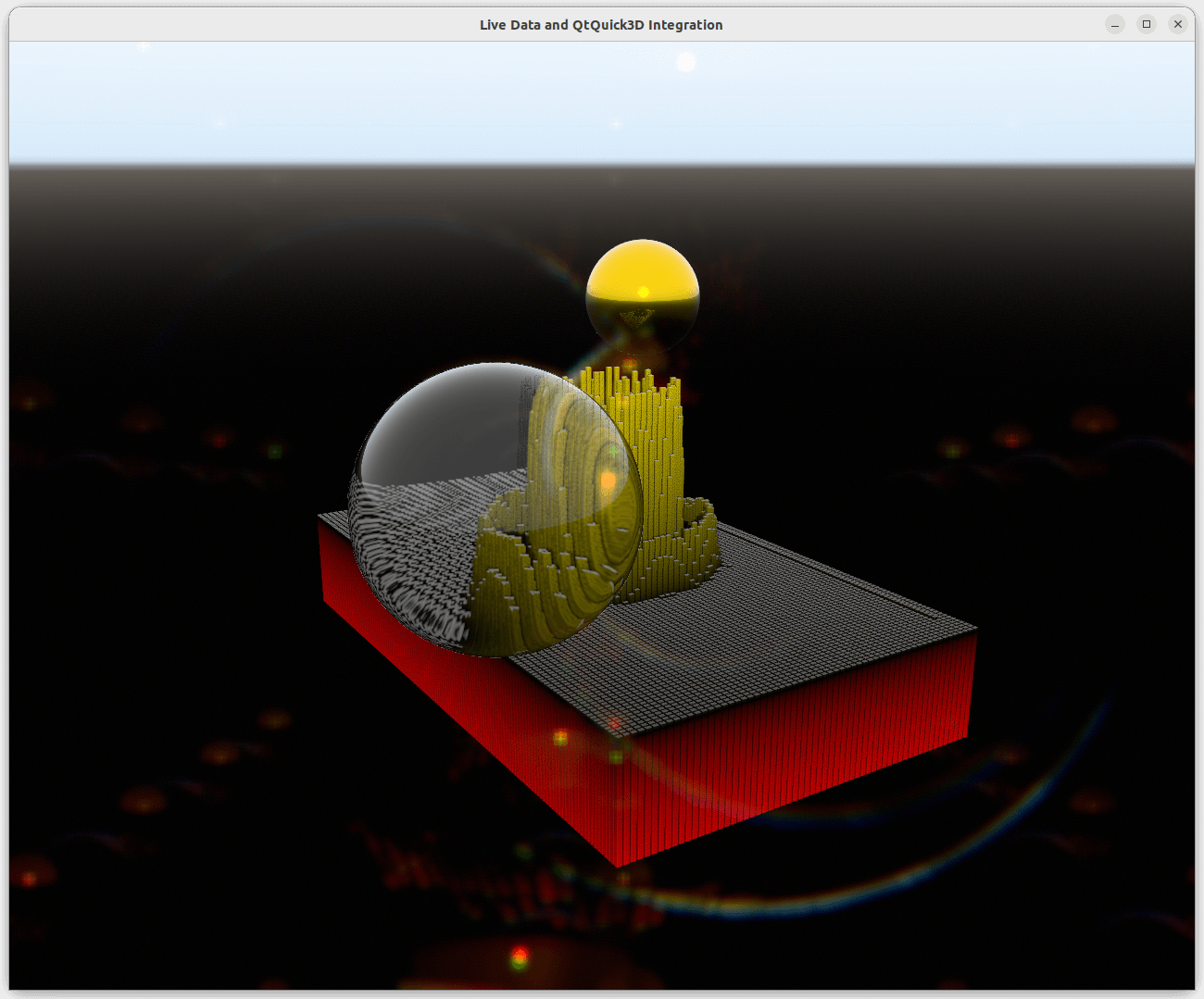
Scene Environment
To adjust a Qt Quick 3D scene environment in a graph, define either SceneEnvironment or ExtendedSceneEnvironment in the environment property
of the graph as follows:
environment: ExtendedSceneEnvironment {
    aoEnabled: true
    aoDither: true
    ditheringEnabled: true
    lightProbe: Texture {
        textureData: ProceduralSkyTextureData {
            groundBottomColor: "black"
            skyTopColor: "white"
        }
    }
    backgroundMode: SceneEnvironment.SkyBox
    lensFlareEnabled: true
    lensFlareGhostCount: 10
    lensFlareApplyStarburstTexture: true
    lensFlareBloomBias: 0.4
}
Non-supported Features
Overriding antialiasing mode or scene clear color doesn't work, which means that setting value for SceneEnvironment.antialiasingMode and SceneEnvironment.clearColor
does nothing. However, if the backgroundMode is not set to SceneEnvironment.Color, background will be affected by the settings.
Scene Integration
To integrate a Qt Quick 3D scene into a graph, set the graph's importScene property to a Node with the following settings:
importScene: Node {
    Model {
        scale: Qt.vector3d(0.01, 0.01, 0.01)
        source: "#Sphere"
        x: 2.5
        z: 2
        y: 1
        castsReflections: false
        receivesReflections: true
        materials: [
            PrincipledMaterial {
                baseColor: "gold"
                metalness: 1.0
                roughness: 0.1
            }
        ]
        ReflectionProbe {
            boxSize: Qt.vector3d(6, 3, 5)
            boxOffset: Qt.vector3d(-1.5, -1, -1.5)
            parallaxCorrection: true
            quality: ReflectionProbe.High
        }
    }
    Model {
        scale: Qt.vector3d(0.01, 0.01, 0.01)
        source: "#Sphere"
        x: -2.5
        z: -2
        y: 1
        castsReflections: false
        receivesReflections: true
        materials: [
            PrincipledMaterial {
                baseColor: "white"
                metalness: 0.0
                roughness: 0.0
                transmissionFactor: 1.0
                thicknessFactor: 50
            }
        ]
    }
}
Adding Nodes directly as children to the graph will not work, because the default child for a graph is the corresponding series.


