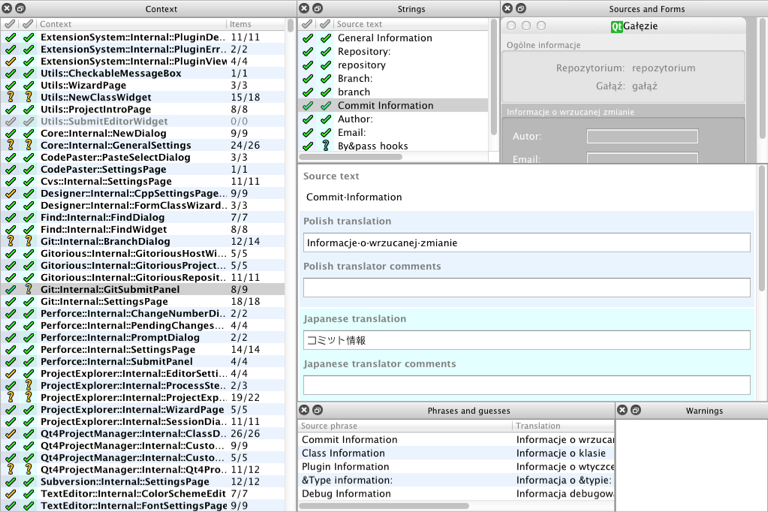
You can load and edit multiple translation files simultaneously. The following screen shot displays Polish and Japanese translation files loaded.
The translation area has color-coded text editing areas for both Polish and Japanese. The Context view and the Strings view have color-coded status columns for each language.
The Items column in the Context view combines the values for both languages. If the number of translatable strings does not match the number of accepted strings, either or both
languages have strings that you need to translate or accept. The Strings view shows the translation acceptance state of each string for each language.
By signing up, you consent to Felgo processing your data & contacting you to fulfill your request. For more information on how we are committed to protecting & respecting your privacy, please review our privacy policy.
Want to find out if Felgo is a good fit for your company?
As part of the free Business evaluation, we offer a free welcome call for companies, to talk about your requirements, and how the Felgo SDK & Services can help you. Just sign up and schedule your call.
Sign up now to start your free Business evaluation: